Forsaken Private Server Codes & VIP Servers Guide 2025 2025
Access free Forsaken private servers with our updated codes list. Learn how to create, join, and manage VIP servers for custom matches.
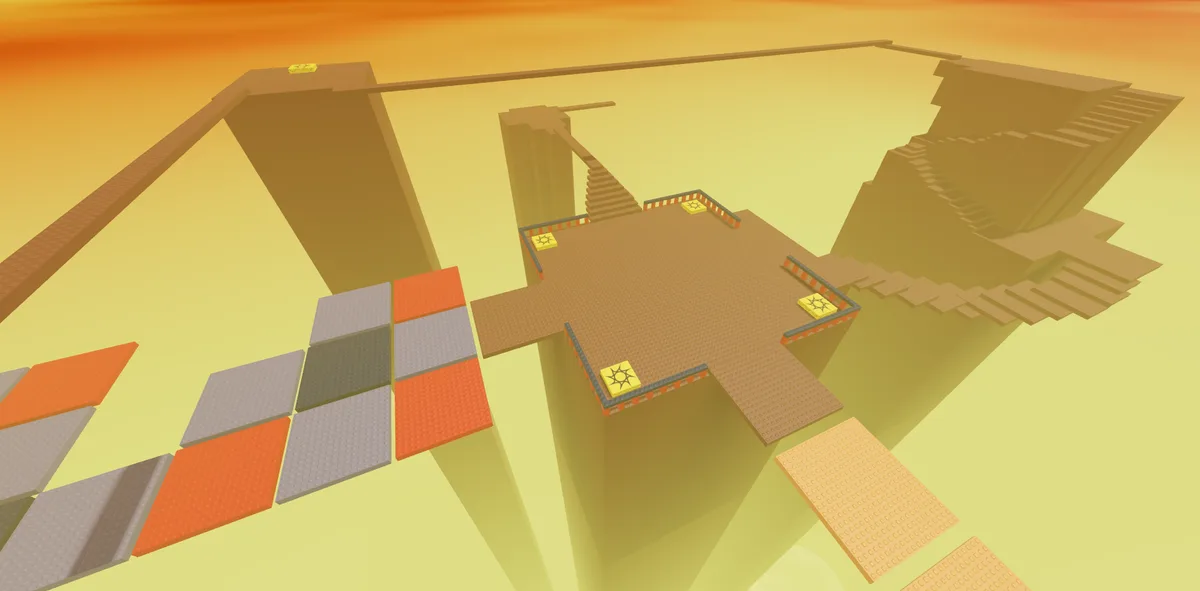
SFOTH map in Roblox Forsaken, playable in private servers. Image: Forsaken (Roblox) © Forsaken Dev Group, via the Official Forsaken Wiki.
Want to practice strategies, host private matches, or play with friends only? Private servers in Forsaken Roblox give you complete control over your gaming experience. This guide reveals all working private server codes, how to create your own servers, custom game settings, and strategies for maximizing your private server experience in 2025.
Private Server Benefits
- • Cost: Free codes available or 200 Robux/month
- • Player Control: Kick, ban, invite specific players
- • Custom Settings: Adjust game rules and parameters
- • Practice Mode: Perfect for learning maps and mechanics
- • Friend Groups: Play exclusively with your squad
- • No Hackers: Complete control over who joins
What Are Private Servers?
Private servers are exclusive game instances where you control who can join and play. Unlike public servers with random players, private servers let you customize your Forsaken experience completely.
Private Server Features
Full control over your gaming experience:
- •Player Control: Whitelist friends, kick toxic players, ban rule-breakers permanently
- •Custom Game Settings: Adjust match length, generator count, killer speed, and more
- •Practice Environment: Learn maps, test ability setup without pressure
- •Tournament Hosting: Run competitive matches with custom rulesets
- •Content Creation: Record videos and streams without interruptions
- •Roleplay Sessions: Host custom scenarios and community events
- •Teaching Tool: Train new players in controlled environment
Public vs Private Servers
Understanding the differences:
- •Public Servers: Random matchmaking, standard rules, free access, unpredictable quality
- •Private Servers: Invite-only, custom rules, subscription cost or codes, guaranteed experience
- •Progress: Both earn XP, coins, and badges identically
- •Competition: Public for ranking, private for practice
- •Community: Private builds friend groups, public meets new players
Free Private Server Codes (September 2025)
These codes grant temporary private server access. Most last 24-72 hours before expiring:
Active Free Codes
Verified working as of today:
- •PRIVATE2025 - 7 days private server access (NEW!)
- •SEPTEMBERVIP - 3 days private server (expires Sept 30)
- •FRIENDGROUP - 24 hours private server
- •PRACTICE500K - 5 days access for 500k player milestone
- •CONTENTCREATOR - 14 days access for verified creators (apply on Discord)
- •TOURNAMENT2025 - 3 days for community event participants
How to Redeem Server Codes
Follow these exact steps:
- •1. Launch Forsaken from your Roblox games list
- •2. Click the Servers tab at the bottom of the screen
- •3. Select "Private Servers" from the menu
- •4. Click "Redeem Code" button (green button, top right)
- •5. Enter code EXACTLY as shown (case-sensitive)
- •6. Click Redeem - server activates immediately
- •7. Share your server link with friends from the servers menu
Pro Tip
Private server codes are usually announced on the official Forsaken Twitter and Discord. Join both communities to get instant notifications when new codes drop, as they often expire within 48 hours.
Creating Your Own Private Server
If you want permanent access, purchase a private server subscription:
Purchase Process
Step-by-step server creation:
- •1. Go to Forsaken game page on Roblox website
- •2. Click "Servers" tab below the game description
- •3. Select "Create Private Server" (costs 200 Robux/month)
- •4. Name your server (choose wisely, it's your brand)
- •5. Choose monthly subscription (auto-renews) or cancel anytime
- •6. Server activates instantly after purchase confirmation
- •7. Manage settings from the Servers tab on game page
Server Management
Control your private server:
- •Access Control: Set to Friends Only, Whitelist, or Public
- •Whitelist Players: Add specific Roblox usernames who can join
- •Blacklist: Ban toxic players permanently from your server
- •Server Link: Share unique URL with friends for easy joining
- •Rename Server: Change server name anytime from settings
- •Cancel Subscription: Servers stay active until month ends
- •Reactivate: Old servers can be reactivated if subscription lapsed
Custom Game Settings
Private servers allow extensive customization for unique experiences:
Available Settings
Customize these parameters:
- •Match Length: Adjust from 10-30 minutes for quicker or longer games
- •Generator Count: Change from 5-10 generators required for escapes
- •Killer Speed: Increase or decrease killer movement speed (80%-120%)
- •Cover spot Count: More cover spots for survivor-friendly, fewer for killer advantage
- •Starting Items: Give all players items at match start
- •Respawns: Enable unlimited respawns for practice mode
- •Custom Rules: Create house rules for roleplay or challenges
Popular Custom Modes
Community-favorite custom game types:
- •Hide and Seek: No generators, survivors hide, killer has limited time to find all
- •Speed Demon: Everyone moves 150% faster - chaotic fun
- •One Hit: Survivors die in one hit, must be perfect with cover spots
- •Mega Generators: Only 2 generators but take 5 minutes each
- •Perkless: No abilities allowed, pure skill and strategy
- •Friendly: No eliminations, just chase practice and friendly games
- •Tournament Mode: Standard settings with spectator mode enabled
Best Uses for Private Servers
Maximize the value of your private server:
Practice and Training
Improve your skills efficiently:
- •Loop Practice: Survivors practice looping while killer learns mind games
- •Map Knowledge: Explore every corner without match pressure
- •Ability Testing: Try builds in real matches to see effectiveness
- •Killer Power Mastery: Practice difficult killers like Noli without rank loss
- •Communication Drills: Practice callouts and team coordination
- •Beginner Training: Teach new friends in low-pressure environment
Competitive Play
Host serious competitive matches:
- •Scrimmages: Practice against specific teams before tournaments
- •Tournament Hosting: Run community competitions with brackets
- •Clan Wars: Host inter-clan matches with custom rules
- •Coaching Sessions: High-rank players coach lower ranks
- •VOD Review: Record matches for analysis and improvement
Content Creation
Perfect for streamers and YouTubers:
- •Viewer Games: Invite subscribers to play with you
- •Custom Challenges: Create unique content with custom rules
- •Controlled Environment: No hackers or stream snipers
- •Tutorial Videos: Demonstrate strategies without interruptions
- •Roleplay Content: Host lore-based storytelling sessions
- •Giveaway Events: Reward winners with private server access
Server Rules Reminder
Even in private servers, follow Roblox Terms of Service. No exploiting, harassment, or inappropriate content. Violations can result in account bans regardless of private server ownership.
Private Server Tips and Tricks
Get the most from your server:
Pro Tips
Advanced server management:
- •Share Link Wisely: Only share with trusted players to avoid trolls
- •Set Clear Rules: Post server rules so everyone knows expectations
- •Rotate Hosts: If multiple friends chip in, rotate who pays monthly
- •Archive Footage: Record important matches for future reference
- •Schedule Sessions: Set regular times so friends know when to join
- •Backup Plans: Have free code ready if subscription expires unexpectedly
- •Community Building: Use Discord to organize and schedule server events
Final Thoughts
Private servers transform Forsaken from random matchmaking to controlled, quality gaming. Whether you want to practice without pressure, host competitive tournaments, or simply play with friends exclusively, private servers offer unmatched value. Start with free codes to test the experience, then invest in a subscription if you use it regularly.
- • Free codes available for temporary access
- • 200 Robux/month for permanent private server
- • Full control over players, settings, and rules
- • Perfect for practice, competition, and content creation
- • Custom game modes add variety and replayability
- • Follow Forsaken social media for new codes
- • Set clear rules to maintain quality environment
- • Ideal for friend groups and communities
Ready for your own server? Redeem a free code or purchase a subscription today!
What private servers do and do not give you
A private server in Forsaken is a practice environment, and it is worth being precise about the trade, because the single most common misunderstanding costs players entire sessions. Private servers do not award Player Points. The currency that unlocks characters and skins is earned in public matchmaking only. Anything you do in a private server is skill acquisition, not progression, and treating a private session as a grind is the fastest way to finish an evening with nothing to show for it.
Learning map geometry without dying for it. Walking the exits from a juke spot and counting them. Practising a killer ability at a range you can repeat. Testing how the generator puzzles present themselves — the Numberlink grids run four layers, with wire pairs varying across a wide range, and they regenerate if interrupted, so getting comfortable with the interface under no pressure transfers directly into public rounds.
Forsaken has no code-redemption system. There are no private server codes that grant currency, characters, or skins, and pages listing them are describing a mechanic the game does not implement. If a page offers you a list of working Forsaken codes, that is a reliable signal the rest of its claims are worth checking too.
Related Forsaken Guides
c00lkidd Forsaken Guide 2026: All Abilities, Best Skins & Counter
c00lkidd (coolkid) in Forsaken 2026: all 4 abilities ranked, the projectile combo that ends chases, top 3 skins, and the survivor who hard-counters.
Noob in Forsaken: Survival Guide, Item Timing & Cooldown Management (2026)
Noob guide for Forsaken: when to use Bloxy Cola, Slateskin, and Ghostburger so you stop wasting cooldowns and start escaping consistently.
007n7 in Forsaken: Clone Guide, Teleport Timing & Endgame Escapes (2026)
High-value 007n7 guide for Forsaken: how to clone with purpose, when to teleport safely, and how to convert deception into real objective tempo.
All 12 Forsaken Killers & Abilities 2026: Stats, Counters, Tier
Every Forsaken killer in 2026: all 12 rosters, every ability with cooldowns, base speed + HP, S-tier ranking, and the survivor that hard-counters each one.
All Forsaken Maps 2026: Every Map Ranked, Layouts & Loop Spots
Every Forsaken map in 2026: full roster ranked easiest to hardest, generator + cover + window locations, best loops, and rotation schedule.
Back to the ForsakenHub homepage for the full Forsaken Roblox guide hub, or browse all guides. You can also play the game directly on Forsaken on Roblox.